
Comparison
TinyOwl vs Squoosh
Squoosh and TinyOwl both compress images on your own device. They differ in habit: Squoosh is a free browser tool for tuning one image at a time, while TinyOwl is a Mac app for repeatable batches and an optional handoff to storage you already control.
Short answer
Keep Squoosh if you mostly compress one image at a time, want a free tool with a long list of encoders (including AVIF and JPEG XL), and like a side-by-side quality slider before you download.
Try TinyOwl if you use an Apple Silicon Mac, often run the same resize and compress steps on a batch, and sometimes want the finished files uploaded to your own R2, S3, OSS, COS, or MinIO bucket, then copy a public URL as Markdown from the menu bar.
Many people keep both: Squoosh for careful single-image tuning, TinyOwl for everyday batches and delivery.
What Squoosh does well
Squoosh is a free, open-source web app from Google Chrome Labs. Compression runs locally in the browser using WebAssembly, and the site states that your images never leave your device for that work.
What matters in practice:
- Many encoders in one place, including MozJPEG, OxiPNG, WebP, AVIF, and JPEG XL (beta), so you can try codecs on the same image.
- A side-by-side before/after view with zoom, so you can judge quality before saving.
- Installable as a PWA, and it can work offline after the first load.
- Free, and not tied to a Mac. Any supported browser works.
If your job is “open one screenshot, try two codecs, keep the better file,” Squoosh is hard to beat on price and encoder depth.
Where Squoosh stops fitting everyday batches
These are limits of what the product is built for, not bugs:
- One image at a time in the web app. You open or drop a single file. The official browser app does not do multi-file batches today.
- No compress-then-upload step. You download the result and upload it somewhere else yourself.
- The command-line tool is no longer maintained. In January 2023 the maintainers removed the CLI and libsquoosh, citing staffing, and said the web app would continue.
- A quiet repository. As of October 10, 2026, the last commit on the main
devbranch was from August 2024, and the repository is not archived. In May 2026 a maintainer said in an open issue that he still has publish access and plans to update the AVIF and JPEG XL codecs. That is a stated plan, not a shipped update.
None of this makes Squoosh unusable. It means batch compression plus upload is not what the official web app is for.
How TinyOwl handles those cases
TinyOwl is a local Mac app for Apple Silicon (macOS 12 or later). Compression stays on your Mac. Upload is optional and goes to your bucket with your credentials, not to a TinyOwl server.
A saved workflow looks like this:
Resize (optional) → Compression → Upload (optional)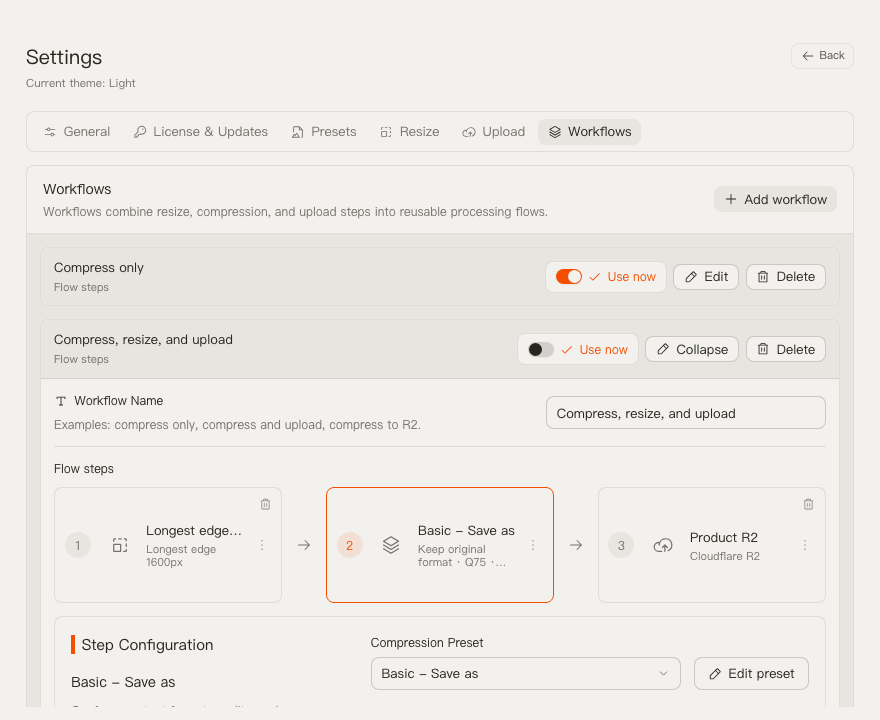
For a blog or docs batch, that comes down to three steps:
- Pick or create a workflow in the main window or in Settings → Workflows. For example, limit screenshot width, export WebP, and save to a folder. Add an upload provider only if you need it.
- Run a batch. Drop files into the main window, drag them onto the menu bar icon, paste with ⌘V while TinyOwl is active, or use Finder Open With → TinyOwl.
- Check the result list for saved path, compressed size, and status. If an upload ran, you can copy the public URL as Markdown from the menu bar.
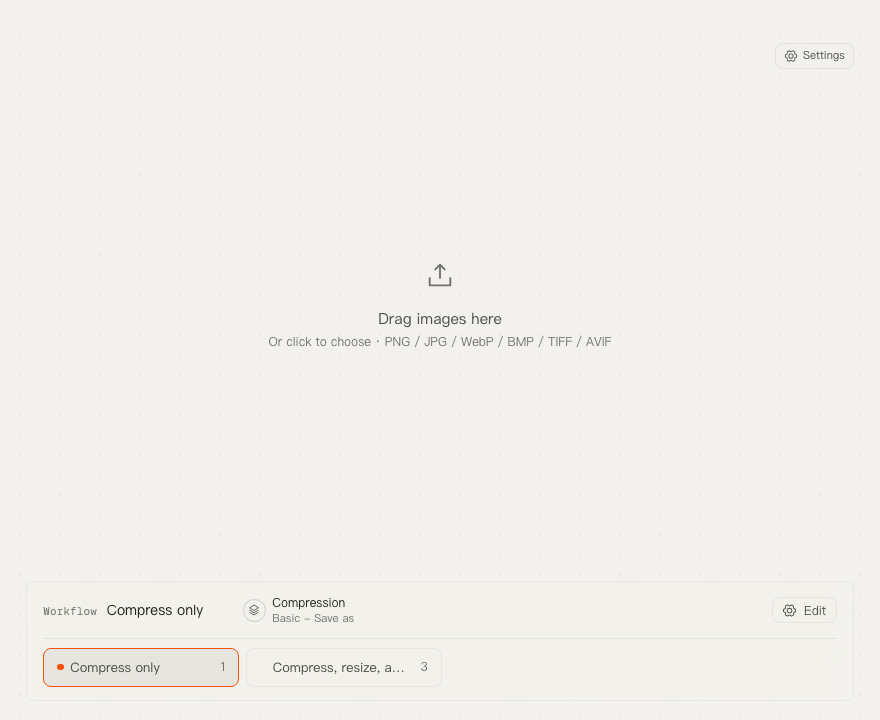
TinyOwl is not an image host and does not create buckets or CDN rules for you. Leave the upload step out when files should stay local.
Key differences
| Question | Squoosh | TinyOwl |
|---|---|---|
| Where does compression run? | Locally in the browser (WebAssembly). | On your Mac. |
| Batch in the main interface | One image at a time. | Multiple images per run. |
| Do source images leave the computer to be compressed? | No. | No. An optional upload sends the finished output to storage you configure. |
| After compression | Download the file and upload it yourself. | Save locally, overwrite if you choose, or upload to your own R2, S3, OSS, COS, MinIO, or compatible endpoint. |
| Preview and compare | Built-in side-by-side view with zoom. | Result list with path, compressed size, and status. There is no in-app codec slider like Squoosh’s. |
| Formats | Wide encoder set in the browser, including AVIF and JPEG XL. See Squoosh’s current interface. | PNG, JPG/JPEG, WebP, BMP, TIFF, AVIF. HEIC is not supported. See the compression guide. |
| Platform | Any supported browser, installable as a PWA. | Apple Silicon Macs running macOS 12 or later. |
| Cost | Free. | One-time license with a 7-day trial, lifetime updates including major versions, and up to 2 Macs. See pricing. |
This page does not publish a speed or file-size race. We have not run a controlled Squoosh-versus-TinyOwl comparison on the same images with matching settings, so a head-to-head number would not be honest.
Which one to choose
Squoosh is the better fit when:
- you compress an occasional single image;
- you want to compare codecs, including AVIF and JPEG XL, with a visual slider;
- you want a free tool and do not want to install an app;
- you do not need saved batch workflows or upload to your own bucket.
TinyOwl is the better fit when:
- you repeat the same resize and compress steps on many files;
- you want to start from the menu bar, clipboard, or Finder on an Apple Silicon Mac;
- you sometimes deliver finished files to storage you already run;
- a one-time license with lifetime updates suits you better than a browser habit plus a separate upload tool.
Stay with Squoosh, or use both, if you need HEIC input, an Intel Mac, or fine per-codec controls that TinyOwl does not expose. TinyOwl also does not process video or PDF files.
To try both safely, use copies of a few images you know well. Run one through Squoosh with MozJPEG or WebP and check the slider. In TinyOwl, start with a save-as workflow that keeps your originals, and add WebP, AVIF, or upload only when it matches how you publish. Compare at the final display size, not only by file size.
FAQ
Does Squoosh upload my images to a server to compress them?
No. Squoosh states that compression runs locally and images never leave your device for that work. Its README notes that it may collect visit analytics, including before and after size numbers, but not your image pixels.
Does Squoosh support batch compression?
Not in the web app, which processes one image at a time. The old command-line route for scripting was deprecated in January 2023.
Is Squoosh discontinued?
The web app still works. The CLI was deprecated in 2023, the main branch has been quiet since August 2024, and the repository is not archived. A maintainer said in May 2026 that he plans to update the AVIF and JPEG XL codecs. Treat that as a maintenance note, not a release date.
Can TinyOwl upload compressed images to R2 or S3?
Yes, as an optional workflow step to your own bucket (R2, S3, OSS, COS, MinIO, or another S3-compatible endpoint). TinyOwl is not an image host.
Does TinyOwl support HEIC?
No. TinyOwl handles PNG, JPG/JPEG, WebP, BMP, TIFF, and AVIF. Convert HEIC files with another tool first.
See the guide for TinyOwl settings, the upload guide for bucket setup, and the compare hub for the other decision guides.